

Bulk Product Image Editing for E-Commerce Success
Your product photos are the single highest-leverage conversion asset in your store. Here is how bulk product image editing software turns a chaotic raw catalog into a polished, marketplace-compliant storefront in minutes.
The correlation between image quality and conversion rate in e-commerce is one of the most well-documented findings in digital retail. Studies consistently show that professional, consistent product photography lifts conversion rates by 30-40 % compared to inconsistent or low-quality imagery. A clean white-background hero shot, a well-lit detail view, and a uniform visual style across every listing build the trust that turns a browser into a buyer.
Yet the operational reality for most merchants is brutal. A Shopify store launching a new collection of 150 SKUs may need 600-900 individual images (hero, angle, detail, lifestyle for each variant). Editing those one at a time in a traditional image editor means weeks of work, delayed product launches, and significant 人力 costs. Every hour spent manually masking backgrounds or resizing canvases is an hour not spent on strategy, marketing, or customer experience.
This is why bulk product image editing software has become the defining operational advantage for scaling merchants. The ability to process hundreds of images through a single automated pipeline — removing backgrounds, standardising dimensions, compressing for web delivery — collapses what used to be a multi-day workflow into a few minutes. This guide walks you through exactly how to build that pipeline, what marketplace standards your images must meet, and which capabilities separate a hobbyist tool from a production-grade e-commerce image background remover.
The Visual Standards of Leading Marketplaces
Every major marketplace enforces strict image compliance rules. Understanding these requirements is essential before you build your bulk editing pipeline, because non-compliance means your listings get suppressed or rejected. Here are the key standards across the three largest platforms:
Amazon
- Main image must have a pure white background (RGB 255, 255, 255).
- The product must fill at least 85 % of the image frame.
- No text, watermarks, logos, or inset images on the main photo.
- Acceptable formats: JPEG, TIFF, PNG. Minimum 1,000 px on the longest side for zoom capability.
- Shadows are prohibited on the main image — the product must appear to float.
Google Shopping
- Images must be clear, well-lit, and representative of the product being sold.
- Recommended aspect ratio is 1:1 (square), minimum 100 x 100 px, maximum 64 megapixels.
- URLs must be crawlable and accessible — no JavaScript-based image loading.
- Watermarks and promotional text are discouraged on the primary image.
eBay
- Gallery image must be at least 500 px on the longest side; 1,600 px recommended for zoom.
- Picture Pack images should be clean, well-lit, and free of distracting backgrounds.
- Stock photo watermarks are not permitted.
- eBay rewards listings with high-quality images through its Cassini search algorithm.
Meeting all of these requirements simultaneously is impossible without an automated marketplace compliance toolthat can enforce white background rules, aspect ratio constraints, and minimum dimension thresholds across an entire catalogue in a single pass.
Key Features to Look for in Bulk Image Processing Software
High-Throughput Parallel AI Background Removal
The core engine of any bulk product image editing software is its ability to remove backgrounds from multiple images simultaneously. Look for a solution that processes files concurrently rather than sequentially. A cloud-based architecture that distributes images across GPU workers can deliver 2,000-5,000 transparent cutouts per hour, compared to 200-400 per hour on desktop batch tools. This throughput is what makes same-day catalogue launches possible.
Consistent Canvas Resizing and Padding
Marketplaces demand specific aspect ratios and product-to-frame ratios. Your bulk tool should let you define a target canvas size (e.g., 2,000 x 2,000 px square) and automatically centre the product with uniform padding. This eliminates the time-consuming step of manually cropping each image to match Amazon's 85 % fill requirement or Google Shopping's 1:1 recommendation. For white background product photography, the tool should enforce pure white background values (255, 255, 255) across the entire batch to prevent the off-white inconsistencies that trigger marketplace rejection.
Automated File Compression for Fast Page Loads
Image file size directly impacts page speed, which directly impacts conversion rate and SEO rankings. A 100 KB image loads measurably faster than a 500 KB image, and on mobile networks the difference is even more pronounced. Quality bulk software includes an automated compression stage that applies lossy-or-lossless optimisation to every output file while keeping visual quality within acceptable thresholds. When youbatch optimize Shopify photos, you want the pipeline to strip metadata, select the optimal format (WebP for web, JPEG for marketplace feeds), and deliver the smallest viable file size for each channel.

Step-by-Step Pipeline to Prepare Your Catalog for Launch
Step 1: Organise raw camera rolls by product and variant
Before any processing touches your images, establish a clear folder structure. Create a root folder per product, with subfolders for each variant (colour, size, material). Place all raw camera output — including hero shots, detail views, and lifestyle imagery — in the appropriate variant folder. This organisation ensures that when you export processed files, the output maps directly to your e-commerce platform's import sheet. A well-structured input folder eliminates the need for post-processing file renaming or reorganisation.
Step 2: Define uniform export dimensions and aspect ratio
Choose a single output dimension for your entire catalogue. For most marketplaces, a 1:1 square aspect ratio at 2,000 x 2,000 px is the safest choice — it satisfies Amazon's zoom requirement, Google Shopping's preference, and eBay's gallery standards. Configure your bulk tool to automatically centre and pad each image so that the product occupies approximately 85-90 % of the frame. This single configuration applies uniformly to every image in the batch, guaranteeing marketplace compliance without manual per-image adjustment.
Step 3: Apply background removal in batches
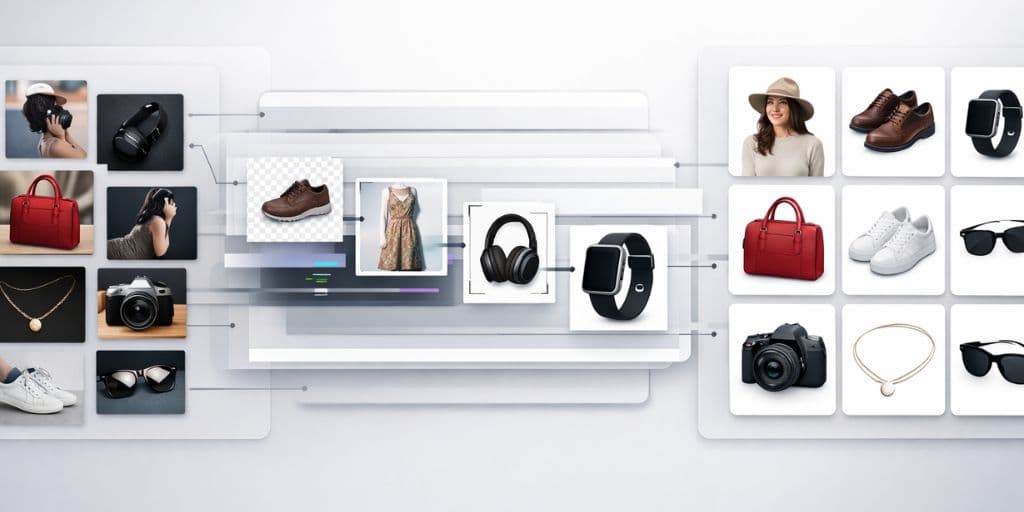
Upload the organised folder to your e-commerce image background remover. The AI processes every image in parallel, stripping backgrounds, enforcing a pure white canvas, and outputting a transparent or white-background PNG for each file. Because the model analyses each image independently, complex edges — hair, fur, glass reflections, fine product contours — are handled per-file while the uniform output settings (white background, 1:1 crop, padding ratio) are applied globally. The result is a folder of production-ready images that all look like they were shot in the same studio.
Step 4: Compress, export, and upload
After background removal and resizing, run the final batch through an automated compression pass. Target a maximum file size of 100-200 KB per image while keeping quality above 85 % (or equivalent perceptual metric). Export in WebP format for your Shopify store (faster loads, better Core Web Vitals) and JPEG for Amazon and eBay feeds. Map the output filenames to your product SKUs or variant IDs so that the import matches your inventory database without manual cross-referencing.
Turn Raw Photos into Compliant Listings in Minutes
Our platform is a powerful, lightweight processing engine engineered specifically for digital merchants. The bulke-commerce image background remover delivers zero-overhead, ultra-fast transparent cutouts that turn chaotic raw photos into clean, marketplace-compliant listings instantly. No software installation, no GPU upgrade, no learning curve. Upload a folder, let the AI process every image in parallel, and download a production-ready set of white background product photography assets in minutes.
Free tier available — no credit card required.
Free • No signup • AI-powered • Batch processing • Marketplace compliant