
RMBG PRO Telegram Bot
Remove backgrounds from images instantly without leaving Telegram. Simply send a photo to our bot and get professional results in seconds.
Start Using the Bot Now
Free to use with default settings. Set your own API key for watermark-free results.
What is RMBG PRO Telegram Bot?
RMBG PRO Telegram Bot brings professional background removal capabilities directly into your Telegram messenger. No need to visit websites, upload files, or install software. Just send a photo to our bot and receive a perfectly processed image with a transparent background in seconds.
Built with the powerful RMBG.PRO API, our Telegram bot provides the same high-quality background removal you expect from our web service, but with the convenience of Telegram's instant messaging platform. Whether you're a photographer, e-commerce seller, or content creator, you can now process images on the go, right from your mobile device or desktop Telegram app.
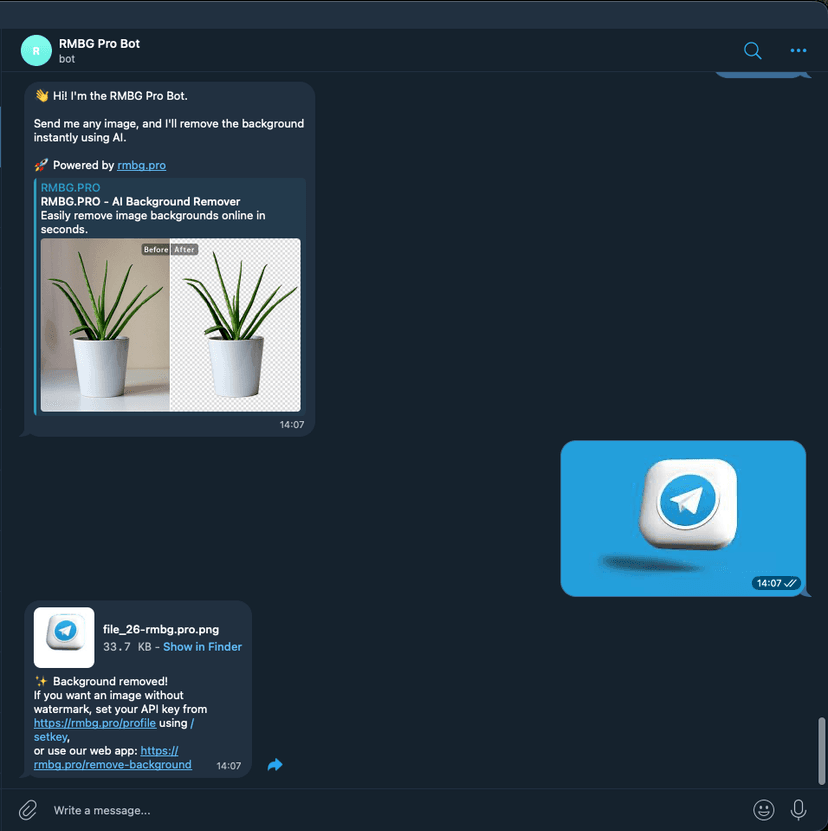
See the Bot in Action
Simple interface, powerful results

Key Features
Instant Processing
Send any image and get results in seconds. No waiting, no delays.
Personal API Key Support
Set your own RMBG.PRO API key for watermark-free, unlimited processing.
Preserves Original Filename
Output files keep your original name with -rmbg.pro.png suffix.
Works on Any Device
Use from your phone, tablet, or desktop. Works wherever Telegram works.
Secure & Private
Your API key is stored securely and never shared. Only you can use your saved key.
Easy Commands
Simple commands for setup, help, and managing your API key.
Bot Commands & Usage
/startWelcome Message
Sends a welcome message and basic instructions to get you started with the bot.
/helpUsage Guide
Shows a short usage guide: send a photo or an image document (JPG/PNG) to remove its background.
/setkeySet Your API Key
Saves your personal RMBG.PRO API key so the bot uses it for your images. Get your API key from https://rmbg.pro/profile
Example:
/setkey 3716342f-9961-4a98-90e8-c45c1814ee00- Your key is stored locally in SQLite and is not shown back in full
- Only you (your Telegram user ID) can use your saved key
- If the key is invalid or out of credits, you may see an error or watermark
/apikeyCheck API Key Status
Shows whether your API key is set (masked for security). Helps you verify if you have a key configured.
/delkeyRemove Your API Key
Removes your saved key. The bot will fall back to the default key/environment settings.
How to Use the Bot
Open the Bot
Click the link below or search for @rmbgpro_bot in Telegram and start a chat.
Open Bot in TelegramSend Your Image
Simply send a photo or image file (JPG/PNG) to the bot. You can send it as a photo or as a document for better quality.
Get Your Result
The bot will process your image and send back a PNG file with transparent background. The filename will be your original name with -rmbg.pro.png appended.
Optional: Set Your API Key
For watermark-free results and unlimited processing, get your API key from rmbg.pro/profile and use the /setkey command.
Pro Tip
Send images as documents instead of compressed photos to maintain the highest quality. The bot processes both formats, but document uploads preserve original image quality.
Telegram Integration
Seamlessly integrated into your Telegram workflow

Troubleshooting
API key invalid or depleted
Update your key with /setkey YOUR_API_KEY. Make sure you have sufficient credits in your RMBG.PRO account.
Still see watermark
Ensure your API key is active and has credits. The bot will use your key if it's properly set. Check your key status with /apikey.
Bot not responding
Try sending /start to reinitialize the bot. If issues persist, the bot may be temporarily offline for maintenance.
Key configuration issues
If issues persist, try /delkey then /setkey again or contact the bot owner.
Privacy & Security
Secure Storage
API keys are masked in all user-facing messages and stored securely in a local SQLite database.
User Isolation
Keys are bound to your Telegram user ID. Only you can access and use your stored API key.
Data Persistence
Database is stored at /app/data/bot.db and persists across deployments via volume mounting.
Best Practices
Do not share your API key with others. Keep your Telegram account secure to protect your stored credentials.
Frequently Asked Questions
Is the bot free to use?
Yes! The bot is free to use with default settings. However, images processed with the default key may include the RMBG.PRO watermark. Set your own API key for watermark-free results.
How do I get an API key?
Visit rmbg.pro/profile to create an account and get your personal API key. You can choose from various pricing plans based on your needs.
What image formats are supported?
The bot supports common image formats including JPG and PNG. Output is always in PNG format with a transparent background for maximum compatibility.
Is my API key safe?
Yes! Your API key is stored securely in a local database and is masked in all messages. Only you (identified by your Telegram user ID) can use your stored key.
Can I process multiple images at once?
You can send multiple images one by one to the bot, and it will process each image individually. For bulk processing, consider using our web service or macOS app.
More RMBG PRO Solutions
Start Removing Backgrounds in Telegram
Join thousands of users who process images effortlessly with RMBG PRO Telegram Bot.
Free to use • Instant results • Secure & Private